• Distributed version Control system(VCS) or Source control management(SCM)
  • Allows collaboration of work between multiple developers
  • Keeps signature of who did what and when
  • Deals with local as well as remote repo
git init //initialize local git repo - will create .git folder


with no other info given output of the
git status and git show


adding two files to local repo(used touch cmd and vi editor to edit the file)
git status


add file(s) to index/staging area before commit
git add <file>


to unstage the file
git rm --cached <file>


to add all files
git add .


commit changes in index
git commit -m 'comment/message'


create branch
git branch <branch name>
git branch branch1


to change to the branch from master
git checkout <branch name>
git checkout branch1


git branch                 // list branches
git branch -a                   //list all branches
git branch -d <branch name> //delete branch


to merge the branch changes to master(checkedout in master)
git merge -m "message" <branch name>


git show  //shows author, email id and where the head is point(master or branch)
git show-branch


Remote repo

git push //push to remote repo


At the time of copying the github repo URL for cloning, showed following error
NPriya@ODSWER42SH MINGW64 ~/Desktop/rp/webzash/yaap
$ git clone –https://github.com/librelab/yaap.git
Cloning into 'yaap'...
fatal: protocol '–https' is not supported

it was because of pasting it using cntrl + v on the mingw64 terminal which inserts a hidden ^?

use the right click - paste         //to paste the correct URL


git pull //pull latest from remote repo
git clone //clone repo in a new dir


Git configuration

git config --global user.name "<username of your github account>"
git config --global user.name "librelab"
git congig --global user.email yourmail@gmail.com


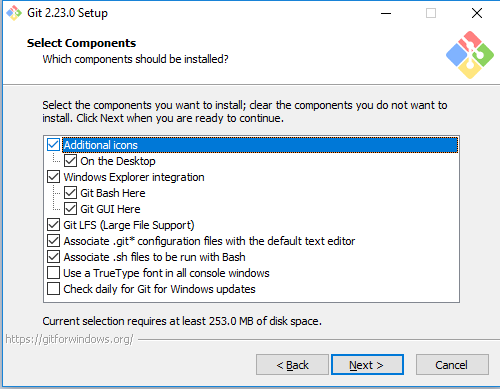
Use git for windows (https://gitforwindows.org), to access git version control on windows.
Installation is a straight forward process.
It's released under GPL v2.


By default it uses vim as the editor


Look and feel of mingw64
It's a straight forward task(screenshot included) even with antivirus @ bg.

It supports various framework, intend to make use of Cakephp (MVC approach)

Remeber the MySQL root pwd
Remember the ports for Apache web server and MySQL(how to get that info using manager-windows.exe, see below)


Launch the WAMP stack - 127.0.0.1:81/index.html
phpmyadmin(web interface) module will alow easy access to MySQL - 127.0.0.1:81/phpmyadmin


One can access the graphical manager tool to start/stop/restart and know port info of the services
It's in the installation dir


How to Generate graph of IOZone output

Output of  the command
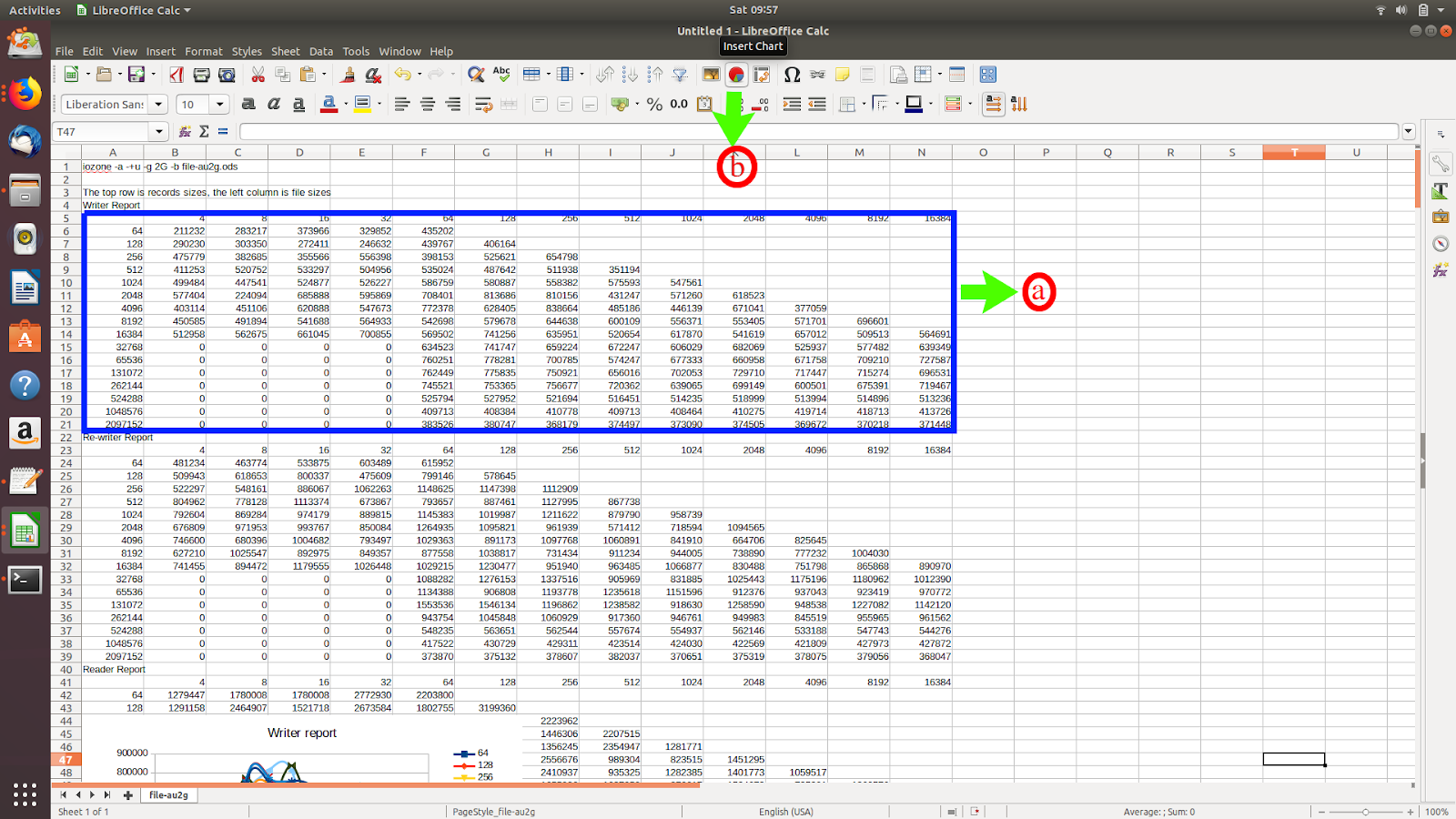
iozone -a -+u -g 2G -b file-au2g.ods

provides benchmark on the filesystem(ext4) which includes various reports namely
writer report
re-writer report
reader report and others
This (howto)graph is generated for only writer report

a Data range used
b select insert chart

In the chart wizard, selected line(c) and line type-> smooth(d)(its your choice what kind of chart you want)

Select e to define the data range

Select the data range f which gets reflected in g

Graph takes its form

No need to fiddle with data ranges and data series

Enter the title, x axis and y axis label

The final output


**Image edited with pinta
Extracted from manual
https://support.hp.com/us-en/product/hp-envy-m6-aq100-x360-convertible-pc/12499188/model/13475168/manuals

  • Processor - Intel Core™ i5-7200U 2.50GHz) processor (2133-MHz FSB, 3.0-MB L3 cache,dual core, 4 Logical Processor(s) 15 W)
  • Mobo chipset - SoC
  • Memory module - Two SODIMM slots 

DDR4 2133 dual channel
Support for up to 16-GB
maximum system memory in
the following conƭJurDtLons
# 16384-MB: (8192-MB × 2)
# 12288-MB: (8192-MB + 4096-MB)
# 8192-MB: (8192-MB × 1)
# 8192-MB: (4096-MB × 2)
# 6144-MB: (4096-MB + 2048-MB)

  • Graphics - Intel HD Graphics 620
  • Storage - Support for all 1P, 7.0-mm and 2P, 9.5-mm, SATA, 2.5-in hard drives
Solid-state drives:  Form factor  M2 Support for: 256-MB, M2.2280


Hardware VT - Yes

Hint on how to remove back cover

Placeholder for HDD, M2 and RAM
top